> ## Documentation Index
> Fetch the complete documentation index at: https://docs.biomni.phylo.bio/llms.txt
> Use this file to discover all available pages before exploring further.
# Bug Reporting
> Report issues and help us improve Biomni Lab
Found something that's not working correctly? Here's how to report bugs.
## Quick Report
The fastest way to report a bug:
1. Click the **Help** button in the sidebar
2. Select **Report a Bug**
3. Describe what went wrong
4. Click **Submit**
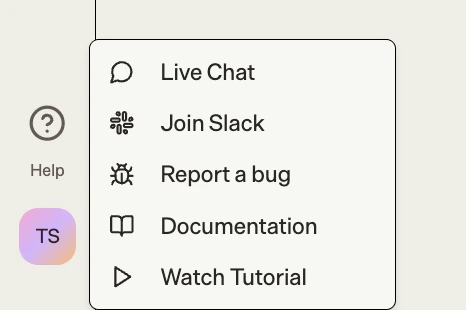 Your report automatically includes session information and error logs.
## What to Include
A good bug report helps us fix issues faster:
* **What happened**: Describe the unexpected behavior
* **What you expected**: What should have happened instead
* **Steps to reproduce**: How can we trigger the bug
* **Screenshots**: Visual evidence helps us understand quickly
## Slack Community
Join our Slack community to connect with other researchers, report bugs, discuss issues, and help improve Biomni Lab together.
1. Click **Help** in the sidebar
2. Select **Join Slack**
Connect with the Biomni Lab community
Your report automatically includes session information and error logs.
## What to Include
A good bug report helps us fix issues faster:
* **What happened**: Describe the unexpected behavior
* **What you expected**: What should have happened instead
* **Steps to reproduce**: How can we trigger the bug
* **Screenshots**: Visual evidence helps us understand quickly
## Slack Community
Join our Slack community to connect with other researchers, report bugs, discuss issues, and help improve Biomni Lab together.
1. Click **Help** in the sidebar
2. Select **Join Slack**
Connect with the Biomni Lab community