> ## Documentation Index
> Fetch the complete documentation index at: https://docs.biomni.phylo.bio/llms.txt
> Use this file to discover all available pages before exploring further.
# Customer Support
> Get help from the Biomni Lab team
Need help with Biomni Lab? Our support team is here to assist you. Choose the option that works best for your needs.
## Getting Help
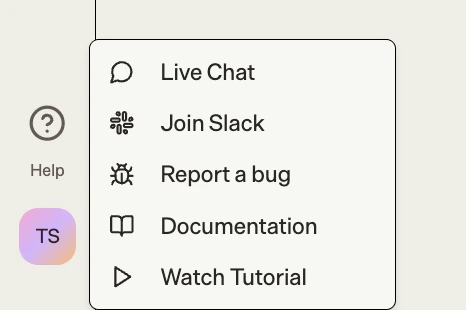
All support options are accessible from the **Help** button in the sidebar:
1. Click the **Help** button in the sidebar
2. Choose from:
* **Live Chat** - Chat with our support team
* **Join Slack** - Connect with other researchers and help improve Biomni Lab together
* **Report a Bug** - Submit bug reports
 ## Live Chat
The fastest way to get help:
1. Click **Help** in the sidebar
2. Select **Live Chat**
3. Type your question
4. A support team member will respond
## Email Support
For detailed inquiries or if you prefer email:
[support@phylo.bio](mailto:support@phylo.bio)
## Slack Community
Join our Slack community to connect with other researchers, share insights, get help, and help improve Biomni Lab together:
1. Click **Help** in the sidebar
2. Select **Join Slack**
Biomni Lab Community Slack
## What We Can Help With
Account setup, navigation, first analysis
Errors, unexpected behavior, troubleshooting
Tool selection, workflow design, best practices
Subscription, invoices, account management
## Before Contacting Support
To help us help you faster:
Your question might be answered in our [docs](/introduction)
Someone may have asked the same question
Note any error messages, what you were doing, and what you expected
Refresh the page, clear cache, or try a different browser
## Contact Information
| Type | Contact |
| ---------------- | --------------------------------------------- |
| General Support | [support@phylo.bio](mailto:support@phylo.bio) |
| Enterprise Sales | [support@phylo.bio](mailto:support@phylo.bio) |
| Press Inquiries | [support@phylo.bio](mailto:support@phylo.bio) |
## Live Chat
The fastest way to get help:
1. Click **Help** in the sidebar
2. Select **Live Chat**
3. Type your question
4. A support team member will respond
## Email Support
For detailed inquiries or if you prefer email:
[support@phylo.bio](mailto:support@phylo.bio)
## Slack Community
Join our Slack community to connect with other researchers, share insights, get help, and help improve Biomni Lab together:
1. Click **Help** in the sidebar
2. Select **Join Slack**
Biomni Lab Community Slack
## What We Can Help With
Account setup, navigation, first analysis
Errors, unexpected behavior, troubleshooting
Tool selection, workflow design, best practices
Subscription, invoices, account management
## Before Contacting Support
To help us help you faster:
Your question might be answered in our [docs](/introduction)
Someone may have asked the same question
Note any error messages, what you were doing, and what you expected
Refresh the page, clear cache, or try a different browser
## Contact Information
| Type | Contact |
| ---------------- | --------------------------------------------- |
| General Support | [support@phylo.bio](mailto:support@phylo.bio) |
| Enterprise Sales | [support@phylo.bio](mailto:support@phylo.bio) |
| Press Inquiries | [support@phylo.bio](mailto:support@phylo.bio) |